Platform how-to · Sales operations
Salesforce duplicates: finding duplicate leads, contacts and accounts, and keeping them out of your reports
Salesforce gives you good tools to stop duplicates at the door. The ones already inside still skew your lead counts and account totals. Here is how to find them and report around them while the clean-up runs.
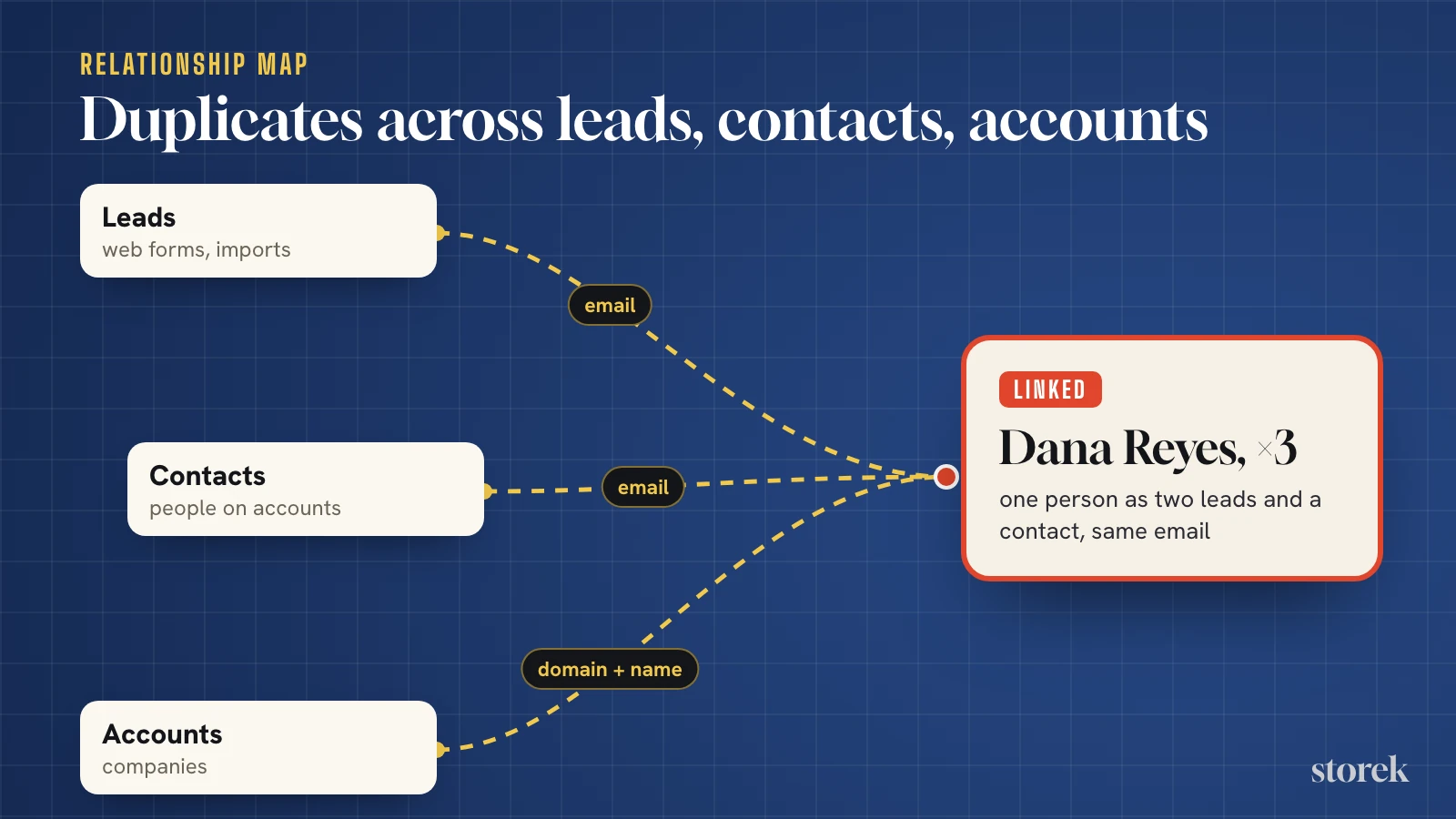
Tomás Okafor runs marketing operations at Brightwater Analytics. In January he reported 3,400 new leads for the quarter. A week later a sales manager forwarded him a screenshot: the same person, Dana Whitlock of Corbel Freight, appeared as four leads and one contact. She had downloaded three white papers and registered for a webinar. Every form fill had created a fresh lead.
Nobody had done anything wrong. The forms worked, the webinar import worked. But “new leads” had quietly become “new form submissions”, and the conversion rate built on top of it was wrong too.
Where Salesforce duplicates come from
Each object collects duplicates in its own way:
- Leads multiply through web forms, event imports and list purchases. The same person often comes in several times before anyone qualifies them.
- Contacts duplicate when a lead is converted without being matched to an existing contact, or when email and calendar sync adds someone a colleague already entered.
- Accounts split when the same company is typed with and without “Inc”, under a brand name and a legal name, or once per office.
And across objects, a lead can describe a person who is already a contact on a customer account. That one matters most, because it sends marketing emails to people your account team already talks to.
Use the tools Salesforce already gives you
Matching rules and duplicate rules
In Setup, Matching Rules define what counts as a match, and Duplicate Rules define what happens when one is found. Salesforce ships standard rules for accounts, contacts and leads, and you can add your own. A sensible start:
- Turn on the standard rules for all three objects if they are off.
- Set them to alert rather than block at first, so people are not stuck mid-call.
- Tick the option to report on duplicates, so matched pairs are logged as Duplicate Record Sets you can review.
- Add a rule that compares leads with contacts on email address.
Merge in small batches
Salesforce lets you merge duplicate accounts, contacts and leads from the record page, a few records at a time, choosing which field values survive. Agree a survivor rule before you start: most recent activity, open opportunity, or the record finance invoices.
Report on what is left
Duplicate rules protect new data. The records already in the org still need a pass. Export leads, contacts and accounts with their IDs, emails, phones, websites and owners, and look for groups that share a strong clue.
Finding the groups in your existing data
Strong clues: a full email address, a phone number normalised to digits with country code, a company registration number. Supporting clues: email domain, website, company name with legal suffixes removed, billing city. One strong clue or two supporting ones make a likely duplicate. Ignore free personal email domains when matching companies.
Then group transitively: if lead A matches lead B by email and lead B matches contact C by phone, all three are one person. The general guide to filtering duplicates walks through the grouping and the survivor rule in more detail.
The question Tomás actually wanted answered
“How many genuinely new people became leads this quarter, not counting people we already had?”
- normalised emails and phone numbers on leads and contacts
- grouped leads that share an email or phone with another lead or an existing contact
- counted each person once, on the date they first appeared
Brightwater added 2,610 new people this quarter; the other 790 leads were repeat form fills or existing contacts.
Dig deeper: see how it works
Storek reads the lead and contact exports side by side and keeps each duplicate group with the clue that linked it. Leads that match a contact on a customer account are flagged separately, so marketing can suppress them and the account owner can see the new interest.
For analysts
WITH people AS (
  SELECT person_group, MIN(created_date) AS first_seen
  FROM (
    SELECT person_group, created_date FROM sf_leads    JOIN person_groups USING (record_id)
    UNION ALL
    SELECT person_group, created_date FROM sf_contacts JOIN person_groups USING (record_id)
  ) GROUP BY person_group
)
SELECT COUNT(*) AS new_people
FROM people
WHERE first_seen >= DATE '2025-01-01' AND first_seen < DATE '2025-04-01';
That number changed the conversation. Conversion from new person to opportunity was higher than the old dashboard suggested, and the “lead volume drop” in one region turned out to be a webinar import that had been counted twice the quarter before.
A routine that keeps it clean
- Weekly: review the Duplicate Record Sets created by your duplicate rules and merge the clear ones.
- Monthly: rerun the export-and-group pass and compare the number of open duplicate groups with last month.
- Every report: count people and companies by group, not by record ID, so dashboards stay right between clean-ups.
- Every import: match the file against existing leads and contacts on email before loading it.
Where Storek fits
Storek connects to Salesforce through its export or connector, beside your billing, support and spreadsheet data, and works out which leads, contacts and accounts describe the same person or company. Ask for new leads, active accounts or pipeline by region, and the answer already counts each one once, while your org stays exactly as it is. See how the links are worked out on the data mapping page.