Platform how-to
How to tell whether an AI's answer about your data is right
An AI answer about your data can sound sure of itself and still be wrong. Six short checks, done in a few minutes, tell you which kind you are holding.
You can tell whether an AI’s answer about your data is right by checking six things: which data it read, what it counted, which dates it used, how it joined tables, whether it matches a number you already trust, and whether every figure came from a real calculation. If the answer cannot show you those six things, treat it as a guess, however polished it looks.
None of this needs technical skill. It needs the answer to show its working, and a few minutes of your attention the first time you ask something new.
Why AI answers about data go wrong
A language model is very good at producing a sentence that sounds like an answer. Your data is a different matter. A number about your business is only right if the right rows were counted in the right way, and the sentence around it gives you no sign of whether that happened.
Most wrong answers are not wild. They are close. Revenue that quietly includes refunds. A quarter that runs to today instead of the quarter end. Orders counted twice because each one has two shipments. These are the same mistakes a new analyst makes in their first month, and they are caught the same way: by asking how the number was made. Public guidance on trustworthy AI, such as the NIST AI Risk Management Framework, makes the same broad point: an output you cannot trace is hard to trust.
The six checks
1. Which data did it read?
The answer should name the table or file. If you have two customer lists, one from the CRM and one from billing, you need to know which one it used.
2. What did it count?
“Revenue”, “active customer” and “late” each have more than one reasonable meaning. Find the meaning the answer used and see whether it is the one your team uses.
3. Which dates?
Check the period and the date field. Order date and invoice date can put the same sale in different months.
4. How were tables joined?
When an answer combines two sources, ask what they were matched on. Matching on a customer name instead of an ID drops anyone spelled differently, and a one-to-many link can double a total.
5. Does it match a number you trust?
Pick one figure you already know, such as last month’s invoiced total, and ask for it. A tool that cannot reproduce a known number should not be trusted with an unknown one.
6. Did every figure come from a calculation?
Every number in the answer should trace back to something a query returned. A number that appears in the prose with no source behind it is the clearest warning sign of all.
A worked example
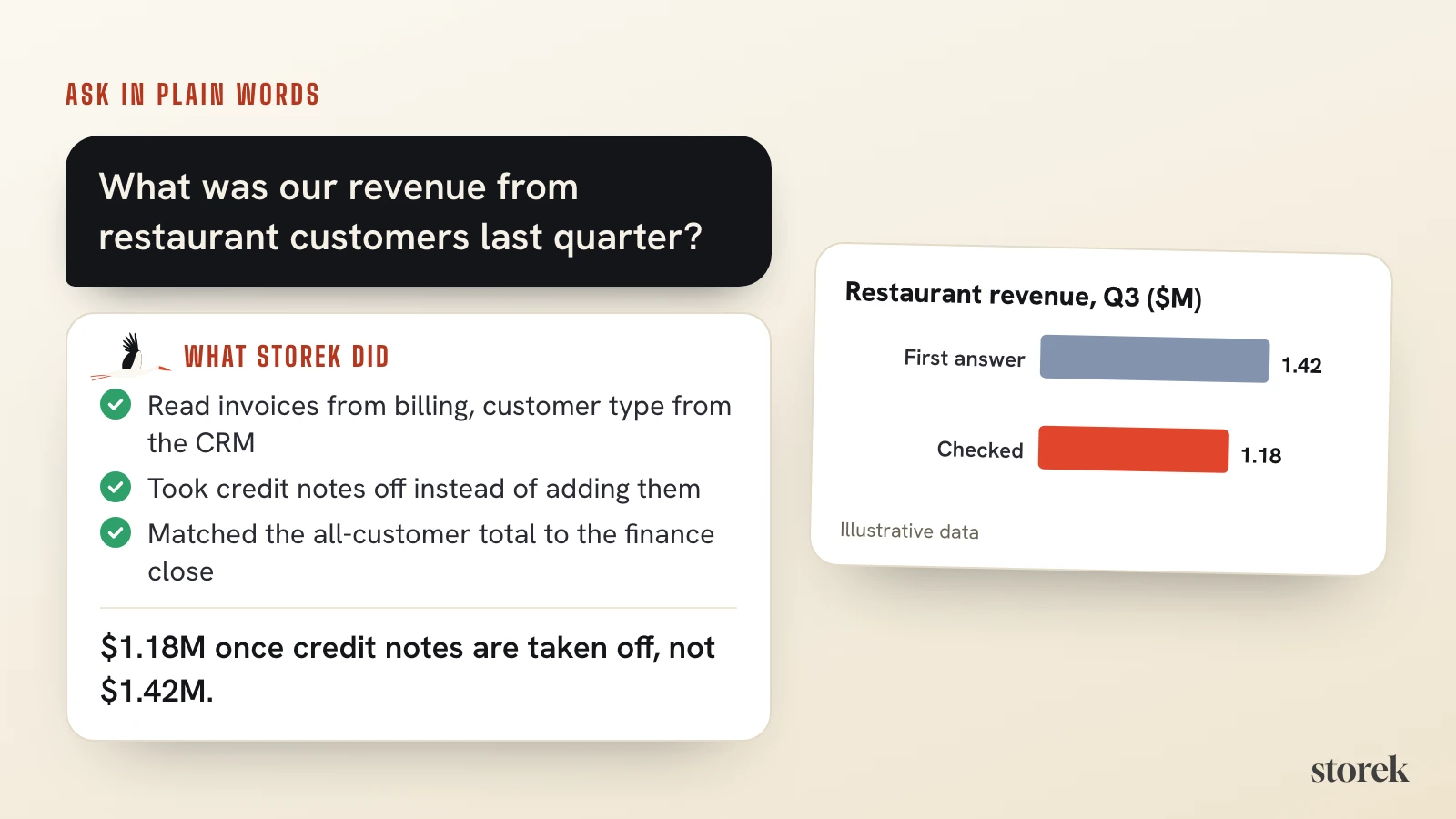
Dana is the finance lead at Fernhill Pantry, a regional food distributor that sells to restaurants, cafes and corner shops. Before a board meeting she asks an AI tool a simple question: “What was our revenue from restaurant customers last quarter?”
The first answer comes back fast and sounds sure: $1.42M, up 9% on the quarter before. Dana has been burned before, so she runs the six checks.
| Check | What she found | Effect |
|---|---|---|
| Which data | Invoices table from billing | Fine |
| What was counted | Every invoice line, credit notes included as positive | Overstated |
| Which dates | Invoice date, July 1 to September 30 | Fine |
| Joins | Customer type taken from the CRM, matched on account ID | Fine |
| Known number | Total for all customers did not match the finance close | Flagged |
| Where figures came from | The 9% growth figure had no query behind it | Unsupported |
Two problems turned up. Credit notes, which are refunds and price corrections, had been added to revenue instead of taken away. And the growth figure had been written into the sentence without any calculation of the earlier quarter at all.
With credit notes taken off, restaurant revenue was $1.18M. Dana then asked for the earlier quarter on the same basis, and got a real comparison. The total for all customers now matched the finance close to the dollar, which told her the method was sound.
The whole exercise took about ten minutes. The board saw a number she could defend, and the meaning of “revenue” was written down so the next question would use it from the start.
Make the checks cheaper over time
The first check on a new kind of question takes the longest. After that, two habits keep the cost low.
Write meanings down once. When the team agrees that revenue means invoiced amount minus credit notes, store that definition where every answer can use it. The next person to ask does not need to rediscover it.
Keep the answers that passed. A question that was checked and found right should be re-run the same way next time, not rebuilt from scratch with fresh chances to go wrong. Spreadsheet users do this with a saved workbook. An AI tool should do the same with its checked method.
If you are working through mismatches between a report and a spreadsheet, the same thinking applies. Our guide on why Power BI numbers don’t match Excel walks through the most common causes one by one.
How Storek helps
Storek is built so these checks are quick to do. Every answer arrives with its working: the method in plain words and the exact query behind it, with the table it came from. Figures that no query returned are removed before you see them. When a word in your question matches nothing real in the data, you are told so and shown what is there, instead of getting a close guess. Definitions such as revenue are written down once and used everywhere, and an answer you have verified re-runs the same checked query next time. You can see how that works on the ask page, and in our piece on asking data questions in plain words.
If you would like to try this on your own invoices, CRM export or support desk data, a free 30-day pilot is the easiest way. Book a demo and we will start with a number you already trust.
Sources
- AI Risk Management Framework · NIST · checked November 15, 2026