Platform how-to · Sales operations
Merging two CRMs after an acquisition: find the shared customers first, migrate second
The deal closes on Friday. On Monday, the board wants to know how many customers the two companies share. The answer is sitting in two CRMs that have never met.
When Halyard Systems bought Quillmark, a smaller competitor, the press release talked about “a combined customer base of over 9,000 companies”. Three days later, Tomás Ferreira in revenue operations was asked to confirm that number for the board.
Halyard ran one CRM. Quillmark ran another. Halyard had about 6,200 customer accounts and Quillmark about 5,000. Adding them up gave 11,200, which everyone knew was wrong, because the two companies had competed for the same customers for years. Nobody knew by how much.
The migration plan said the two CRMs would become one in five months. The board meeting was in two weeks.
Why matching comes before migrating
Most CRM merge plans start with field mapping: which field in system A becomes which field in system B. That work matters, but it skips the question everyone actually asks first: which customers do we share?
That answer decides almost everything else:
- Which record wins. A shared customer needs one owner, one parent account and one history.
- What the combined numbers are. Customers, revenue, pipeline and churn all double count until shared customers are linked.
- Where the sales conflicts are. Two account managers calling the same buyer is the fastest way to lose them in the first month.
Matching first also means leadership gets honest combined numbers in weeks, while the migration takes its time.
How to match customers across two CRMs
The two systems rarely share an ID. Names are unreliable: “Kestrel Logistics Ltd”, “Kestrel Logistics” and “Kestrel (UK)” may or may not be the same company. Combine clues instead, as the identity matching guide explains in detail.
Export accounts and contacts from both sides
Take full exports of accounts and contacts from each CRM, including IDs, website, email domains, phone, billing address and any external reference such as a billing or tax number. Use each CRM’s standard export or connector; you don’t need to change either system.
Match on the strongest clue first
A shared billing or ERP customer number, a tax ID or a company registration number is close to certain. If both companies used the same payment processor or support tool, its customer ID works too.
Combine weaker clues for the rest
Website or email domain plus billing address is strong. Phone number plus city is good. Name alone is not enough. Ignore free email domains and treat big groups with one domain carefully, since subsidiaries may be separate customers.
Send the half matches to a person
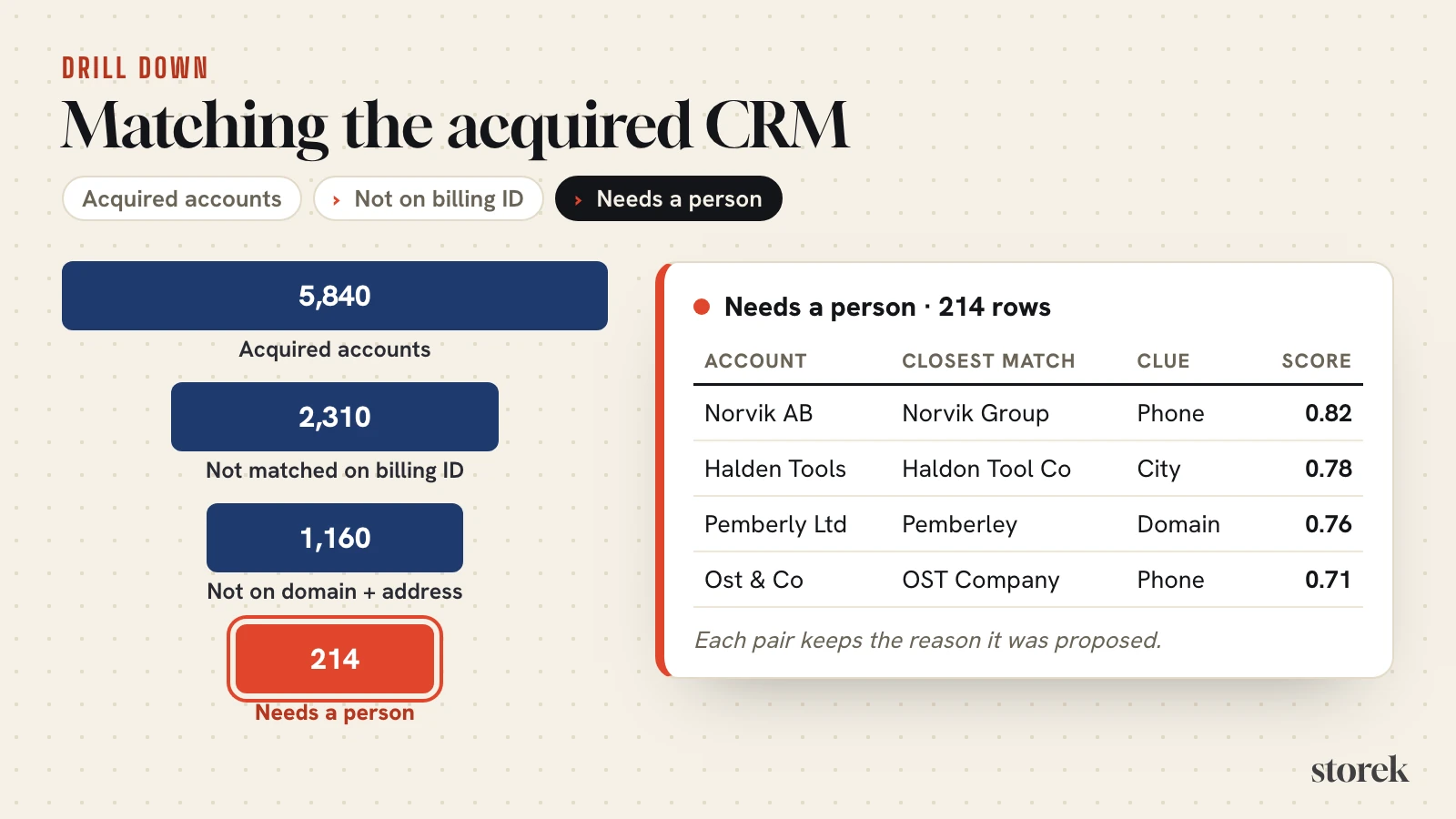
Pairs where only one weak clue agrees go to a short review list, owned by someone who knows the customers. A few hundred rows reviewed by people is cheap compared with a wrong merge.
Link, don't delete
Record each match as a link between the two records. Both stay as they are in their CRMs. Combined reports count each linked pair once.
Halyard’s combined customer count
Tomás connected both CRM exports, plus the billing system Halyard already shared with a few Quillmark customers, to Storek. Storek proposed how the tables relate and matched accounts across the two CRMs on billing ID, email domain, address and phone. Then he asked for the number the board wanted.
“How many customers do Halyard and Quillmark share, and what's the combined customer count?”
- matched Quillmark accounts to Halyard accounts on billing ID first, then email domain with address, then phone with city
- ignored free email domains and name-only similarities
- counted each matched pair once and kept 175 uncertain pairs out of the shared count, listed for review
- filtered known duplicates inside each CRM without deleting them
The companies share 2,410 customers, so the combined base is about 8,800, not 11,200, with 175 pairs still to confirm.
Dig deeper: see how it works
The shared count only includes confident matches. The 175 uncertain pairs are listed separately with the clues that agreed and the ones that didn’t, so the review team can settle them quickly. If every one of them turned out to be a match, the combined count would drop by 175 at most, which is why the answer gives a range rather than a false precise figure.
Each CRM also had duplicates of its own. Those are flagged and left out of the counts, with both records left in place for the migration team.
For analysts
WITH links AS (
  SELECT halyard_account_id, quillmark_account_id, match_rule
  FROM account_links
  WHERE confidence = 'confirmed'
)
SELECT
  (SELECT COUNT(*) FROM links)                                         AS shared,
  (SELECT COUNT(*) FROM halyard_accounts WHERE is_customer AND NOT is_flagged_duplicate)
+ (SELECT COUNT(*) FROM quillmark_accounts WHERE is_customer AND NOT is_flagged_duplicate)
- (SELECT COUNT(*) FROM links)                                         AS combined_customers;
The chart at the top shows how Quillmark’s accounts came out: most matched on a billing ID or a domain plus address, a small group on phone and city, 175 waiting for a person, and the largest group genuinely new to Halyard.
Reporting on both CRMs while you migrate
With the links in place, the two CRMs can be reported on as one long before the migration ends.
Agree the definitions once
“Customer”, “active”, “pipeline” and “churned” probably mean slightly different things at each company. Pick one meaning for the combined reports and write it down. Storek keeps these as shared definitions, so a dashboard and a question asked in chat use the same rule.
Find the account conflicts
A useful early report lists shared customers that have an open opportunity in both CRMs, or an owner on each side. Halyard found 140 such accounts and settled ownership before anyone made a second call.
Find cross-sell gaps
Quillmark customers who don’t buy Halyard’s product, and the reverse, are the cross-sell list the deal was partly made for. With the links in place, it’s a single question. The missing leads article shows the same idea for prospects hiding in other systems.
Then migrate, with the matching done
When migration time came, the hard decisions were already made. Each shared customer had a confirmed link, an agreed owner and a winning record. The migration team mapped fields and moved data, and the combined reports simply switched from two sources to one.
Where to begin
Take the account exports from both CRMs, match on the strongest clue you have, and get one honest combined customer count in front of leadership. In Storek, connecting both exports and asking for the shared customers is a first-afternoon task, and the result can sit on a dashboard or a whiteboard for the integration team to work through together.