Platform how-to · Sales operations
Customer identity across systems: matching the same person or company by email domain, phone, address and IDs
The same company is "Northgate Logistics" in the CRM, "Northgate Log. GmbH" in billing and "northgate.de" in the support desk. Here is how to recognise it as one customer, with evidence you can check.
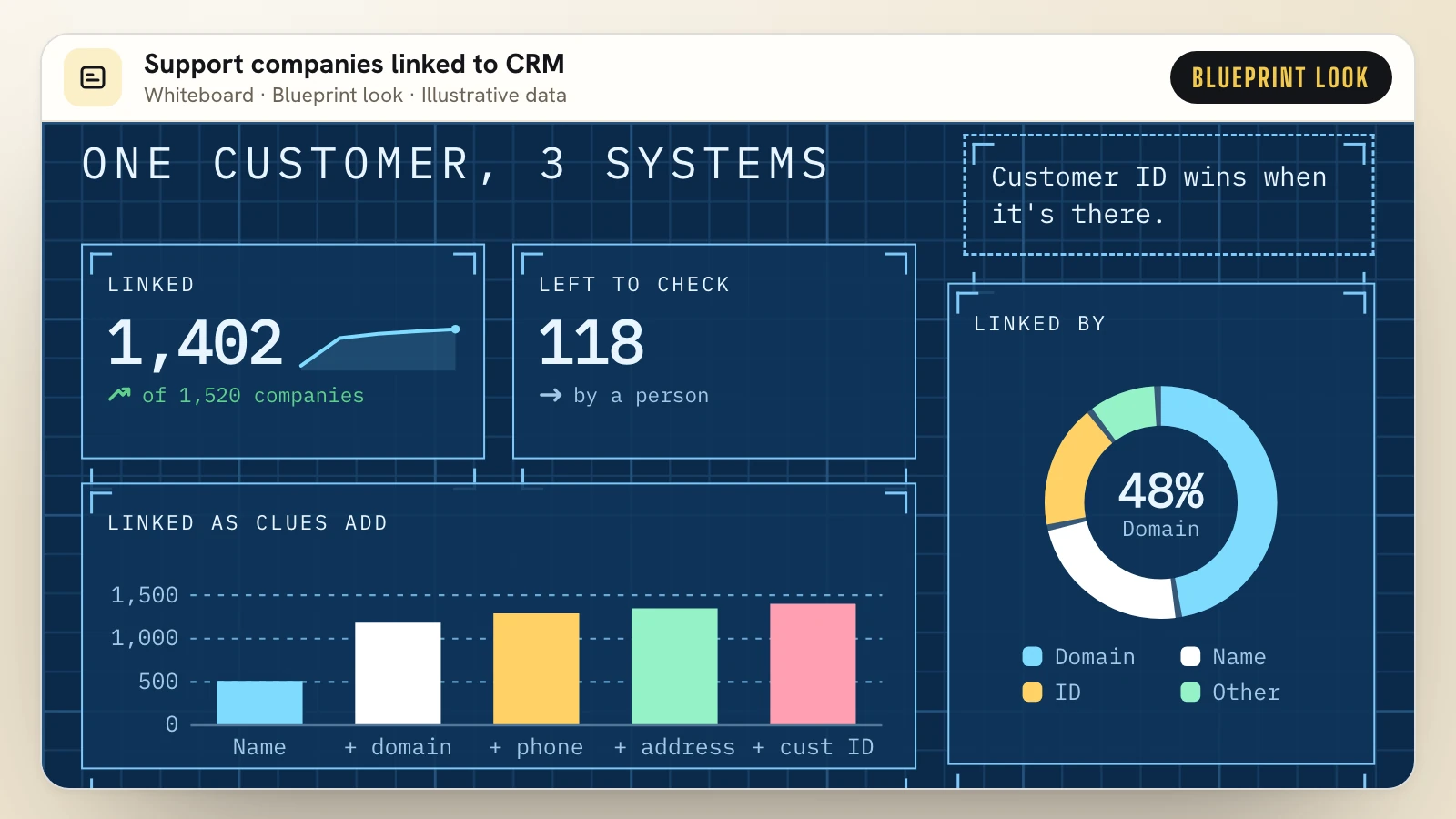
Lena Fischer leads customer success at Kestrel Software. Her renewal review asks a simple question of every account: are they paying on time, and are they opening more support tickets than usual? The CRM knows the accounts. Billing knows the invoices. The support desk knows the tickets. None of them share a customer ID.
Her team had been matching by company name in a spreadsheet. It worked for “Acme”. It did not work for “Northgate Logistics” in the CRM, “Northgate Log. GmbH” in billing and a support desk that simply grouped tickets under the domain northgate.de. Each renewal review began with an afternoon of guessing.
Why each system names the customer differently
Every system records the customer for its own purpose:
- The CRM holds the name sales uses, often the brand.
- Billing holds the legal entity that receives the invoice, with its suffix and its tax number.
- The support desk often groups people by their email domain, because that is what arrives with a ticket.
- Spreadsheets hold whatever the person who built them typed.
None of these is wrong. They are simply different keys for the same customer. The job is to find the clues that connect them.
The clues, from strongest to weakest
IDs
The best link is an ID one system stores about another: the CRM account ID copied into billing, a customer number on support tickets, a tax or company registration number in both CRM and billing. Check whether any of your systems already carry one; it is often there in a custom field nobody reports on. The leading-zeros guide explains how to make sure “00417” and “417” are treated as the same ID.
Email address and email domain
For people, a full email address is close to unique. For companies, a business email domain is a strong clue: everyone at northgate.de works for Northgate. Exclude free personal mail domains and treat shared domains of large groups with care.
Phone number
Strip spaces, brackets and dashes, add the country code, and compare. A shared main switchboard is good evidence for a company; a shared mobile number is good evidence for a person.
Address
Normalise abbreviations (“St” and “Street”), postcodes and country names. An exact postcode plus street number is a solid supporting clue. A city alone is weak.
Name
Lower-case it, remove legal suffixes and punctuation, then compare. Use it to confirm a link found by another clue, not to make one on its own. The match-on-more-than-a-name guide shows how much each extra clue removes wrong matches.
Combine clues into a decision
A practical rule set:
- One shared ID: linked.
- Same business email domain plus a similar name: linked.
- Same phone plus same postcode: linked.
- Only a similar name: not linked; put it on a review list.
- Clues that disagree (same domain, different tax number): review list.
Keep the reason for every link. When someone asks why a billing entity sits under a CRM account, the answer should be “same tax number” or “same domain and same phone”, not “the spreadsheet said so”.
The renewal question, asked once
“Which accounts renewing next quarter have an overdue invoice and more support tickets than last quarter?”
- linked billing customers and support companies to CRM accounts using IDs, email domains, phone numbers and addresses
- kept the reason for each link and set aside the uncertain ones for review
- compared ticket counts quarter on quarter and checked overdue invoices for each renewing account
Nine renewing accounts have both an overdue invoice and rising tickets; Northgate Logistics is one of them.
Dig deeper: see how it works
Storek looks at the actual values in each system to find the links: which columns share email domains, which share phone numbers, which carry an ID from another system. Each link shows the clue behind it, and a person can confirm or reject the uncertain ones once for everyone.
For analysts
SELECT a.account_name,
       SUM(CASE WHEN i.due_date < CURRENT_DATE AND i.paid_date IS NULL THEN i.amount END) AS overdue,
       COUNT(DISTINCT CASE WHEN t.created >= DATE '2025-01-01' THEN t.ticket_id END)    AS tickets_this_q,
       COUNT(DISTINCT CASE WHEN t.created <  DATE '2025-01-01' THEN t.ticket_id END)    AS tickets_last_q
FROM crm_accounts a
JOIN customer_links l ON l.account_id = a.account_id
LEFT JOIN invoices i  ON i.customer_id = l.billing_id
LEFT JOIN tickets t   ON t.org_domain  = l.support_domain AND t.created >= DATE '2024-10-01'
WHERE a.renewal_date BETWEEN DATE '2025-04-01' AND DATE '2025-06-30'
GROUP BY a.account_name
HAVING overdue > 0 AND tickets_this_q > tickets_last_q;
Keep identity maintained
- Store the link, not just the result. A table of CRM account, billing customer, support domain and the reason for the link can be reused by every report.
- Write IDs back where you can. Once a link is confirmed, adding the CRM ID to billing makes the next match trivial.
- Recheck when data changes. New billing entities and new domains appear after acquisitions and rebrands.
Where Storek fits
Storek connects your CRM, billing, support desk and spreadsheets through their exports or connectors and works out how they link, using IDs, email domains, phones and addresses, with the reason for every link on show. Then anyone can ask a question across all of them in plain English. See how on the data mapping page.