Category and comparison
Self-service BI for small teams: how to choose
Most BI tools are self-service for the person who builds the reports. For a small team, the test is whether everyone else can get an answer without waiting for that person.
For a small team, pick the self-service BI tool by one question: who builds and keeps the model that joins your data? If you have someone who will own it, a classic BI tool gives you control and a big community. If you don’t, choose a tool that works out the joins itself and shows its working, because a tool that only lets people drag charts is self-service for one person and a queue for everyone else.
The rest of this guide gives you a way to decide, a look at four common choices as of November 2026, and a small worked example.
Three kinds of “self-service”
The phrase covers three different promises, and most disappointment comes from buying one while expecting another.
- Self-service chartsAnyone drags fields onto a canvas
- Self-service questionsAnyone asks in plain words
- Self-service answersThe answer is right, and shows why
Charts are the easy part. Questions in plain words are now common. Answers you can rely on depend on the model underneath: how tables are joined and what each metric means. Ask every vendor which of the three they mean.
Four common choices, as of November 2026
These notes come from each vendor’s own pages: Microsoft’s Power BI pricing, relationships and Copilot pages; Tableau’s help on relating tables and licenses, and its Tableau Pulse questions page; Google’s Conversational Analytics, blends and Pro subscription docs; and Metabase’s pricing, joins and Metabot pages.
| Tool | Who connects the tables | Plain-language questions | Pricing model |
|---|---|---|---|
| Microsoft Power BI | Autodetect on column names, the rest by hand | Copilot, needs paid Fabric (F2+) or Premium (P1+) capacity | Per user: free to build, Pro $14.00 or Premium Per User $24.00 a month to share (yearly, list price) |
| Tableau | The author relates tables; Tableau suggests matching fields from key constraints | Tableau Pulse: Ask Q&A on one metric; Tableau Agent in Pulse, a Tableau+ feature | Per user: Creator, Explorer or Viewer license |
| Google Data Studio (formerly Looker Studio) | Blends of up to five tables, joined on equal fields | Conversational Analytics with BigQuery data agents; more sources with Pro and Google's AI add-on | No-cost version; Pro self-service licensed per user who creates or edits, billed monthly |
| Metabase | You add a join step; foreign-key columns are pre-filled | Metabot, on every plan | Free open source; Starter $100 a month for 5 users, Pro $575 for 10 (list price) |
Each of these is a good tool, and each is a good fit for someone:
- Power BI fits a company already on Microsoft 365 with a person who will own the model. Microsoft’s own Copilot page advises preparing the semantic model first, which tells you where the work sits.
- Tableau fits teams that care most about rich, hand-built visual analysis and have a dedicated author.
- Data Studio fits marketing teams whose data already lives in Google products, and anyone who needs a free start. (Google renamed Looker Studio back to Data Studio in April 2026, per its release notes.)
- Metabase fits teams with a database and someone comfortable with it; the open-source edition costs nothing to run yourself.
If none of those “someone” lines describes your team, that is the signal to look at tools that build the model for you.
A worked example: renewals at risk
Tomás leads customer success at Brightline, a 20-person software company. His data sits in a support desk export, the billing system and a CRM list of renewal dates. He wants to know which accounts renewing this quarter have open support problems.
In a classic tool, Tomás files the request with the one colleague who built the reports, and waits. In a tool that works out the joins, he asks:
“Which accounts renewing this quarter still have open tickets?”
- Linked tickets to accounts through the company email domain
- Matched accounts to billing on the customer ID
- Took renewal dates from the CRM list
- Kept only tickets not yet resolved
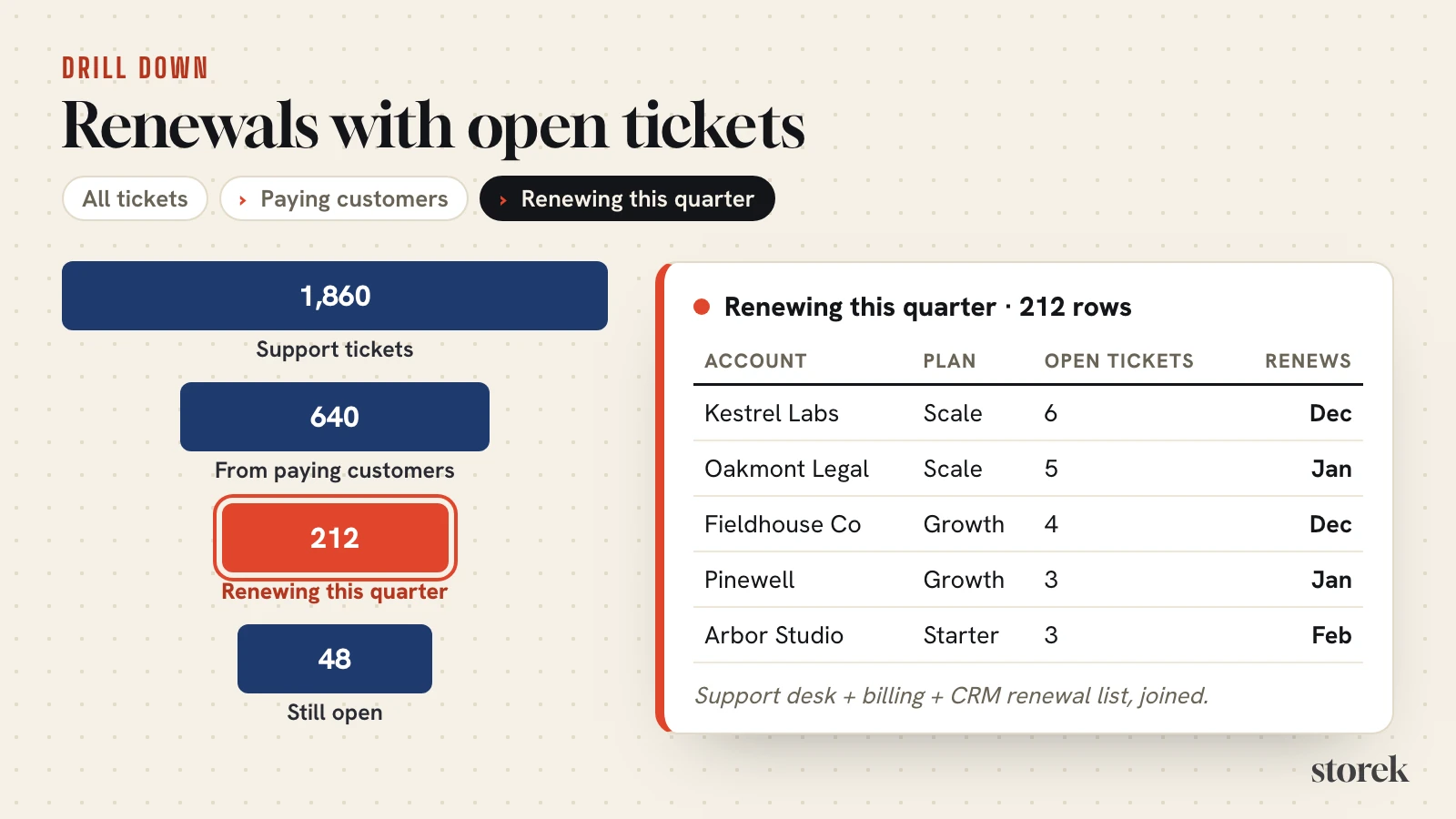
| Account | Plan | Open tickets | Renews |
|---|---|---|---|
| Kestrel Labs | Scale | 6 | December |
| Oakmont Legal | Scale | 5 | January |
| Fieldhouse Co | Growth | 4 | December |
48 open tickets sit with 19 accounts renewing this quarter. Six of those accounts are on the top plan.
He can read the method and see that tickets were matched by email domain. If two of his accounts share a domain, he can say so, and the answer changes. That check is the part of self-service people skip, and it is the part that makes the number safe to bring to a meeting.
A one-week way to decide
Take one real question your team asks every month. Load the actual exports into two or three tools on free versions or trials. Have the person who asks the question, not the most technical person, try to answer it alone. Then add next month’s export and see what breaks. The tool that survives that week is the one to choose. Our Excel to dashboard checklist and questions, not queries cover what to check in each answer.
Where Storek fits
Storek is for teams with no one to own the model. It finds how your spreadsheets, CRM, billing, support desk and sensor feeds connect, so people can ask in plain words and get answers that carry their method and the exact query behind them. It suggests what to ask next and names what is missing. Definitions are written down once, and verified answers re-run the same checked query, so a question asked once stays answered.
It is priced per workspace rather than per user, from $750 a month for Team, billed yearly (monthly billing costs 20% more; see pricing). Qualified teams can try it free for 30 days on their own data. To see it with your exports, book a demo.
Sources
- Metabase pricing · Metabase · checked November 15, 2026
- Metabot · Metabase · checked November 15, 2026
- Joining data · Metabase · checked November 15, 2026
- Data Studio Pro subscription overview · Google Cloud · checked November 15, 2026
- How blends work in Data Studio · Google Cloud · checked November 15, 2026
- Data Studio release notes · Google Cloud · checked November 15, 2026
- Power BI pricing · Microsoft · checked November 15, 2026
- Copilot for Power BI overview · Microsoft Learn · checked November 15, 2026
- Relate your data · Tableau · checked November 15, 2026
- Site roles and licenses · Tableau · checked November 15, 2026
- Ask questions and discover insights in Tableau Pulse · Tableau · checked November 16, 2026
- Conversational Analytics in Data Studio overview · Google Cloud · checked November 16, 2026