Platform how-to · Banking and credit unions
Linking policy, claims, billing and third-party data: the one step that makes every fraud screen sharper
A claim on its own looks ordinary. The same claim beside a lapsed payment, a policy change last week and an address that appears on three other files tells a different story. Linking is the work that makes those stories visible.
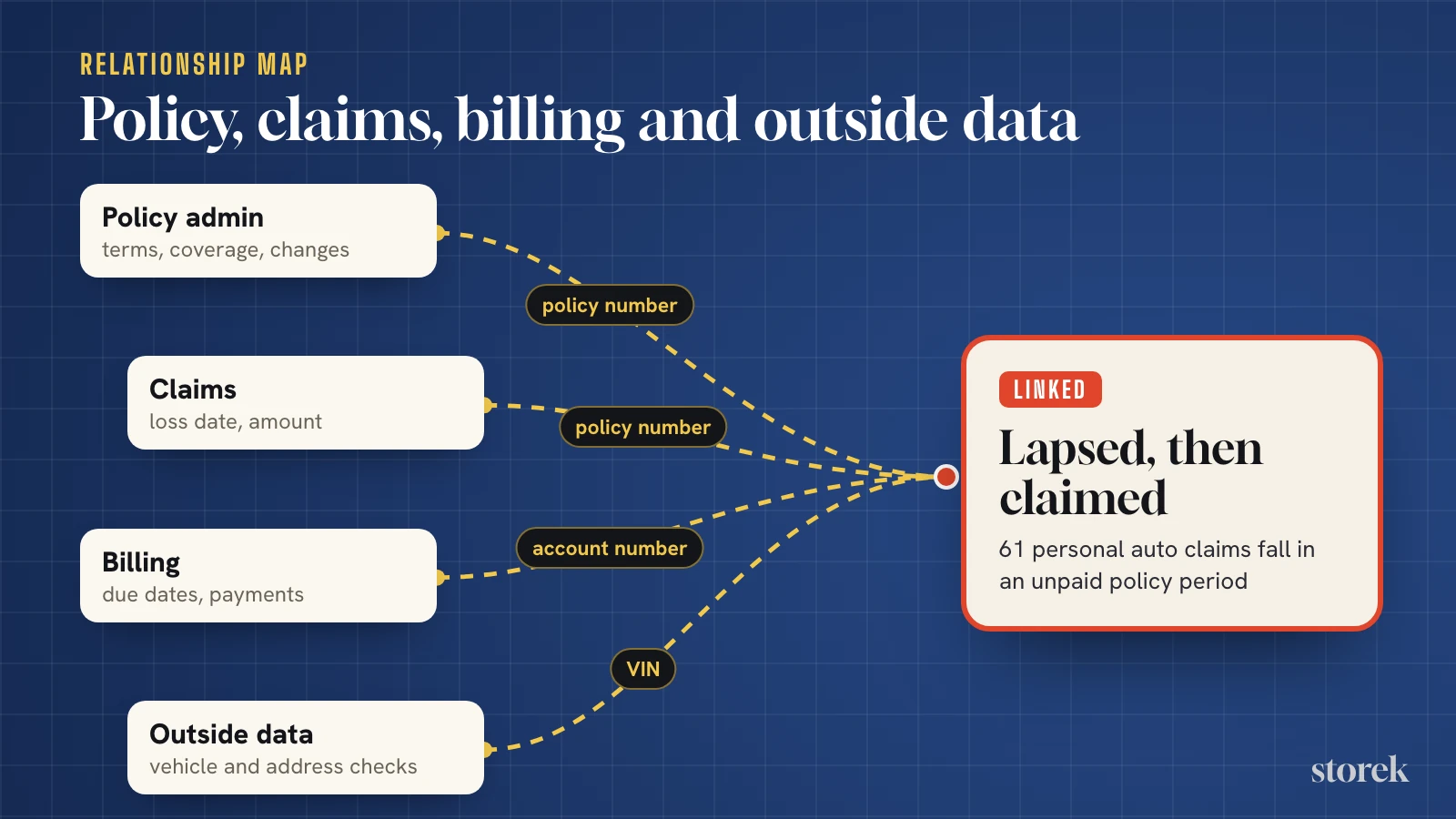
Tamsin runs claims analytics at Orrin Valley Insurance, a fictional regional carrier writing personal auto, homeowners and a little small commercial. Her team has good reports. The claims report counts claims. The billing report counts lapses. The underwriting report counts endorsements. Every Monday someone asks a question that needs all three, and every Monday the answer is “we’d have to pull that together.”
This post is about pulling it together once, so the question stops being a project.
Why red flags live between systems
Most of the classic claims fraud red flags are not facts about a claim. They are facts about a claim in relation to something else:
- a loss shortly after the policy started or coverage was raised (policy system);
- a loss during a grace period or right after a reinstatement (billing system);
- the same phone, address or bank account on unrelated files (claims and payments);
- a vehicle with a salvage history or a business that closed last year (outside data).
Each system answers its own questions well. The flag only appears when two are read side by side.
The four sources and how they connect
Policy
Policy number, effective dates, every endorsement with its date, coverage limits, the insured property or vehicle.
Claims and payments
Claim number, policy number, date of loss, date reported, payees, amounts, and the adjuster’s notes.
Billing
Invoices, payments, lapses, reinstatements and the payment method behind each, keyed by policy or account number.
Third-party data
Whatever helps a question: weather by ZIP and day, vehicle history by registration, a business register by name and address.
Load each export exactly as it comes
No reshaping first. The policy extract, the claims and payments files, the billing ledger and any outside file go in as they are.
Let the shared values propose the links
The claim carries a policy number; billing carries an account that maps to it; weather carries a ZIP and a date. Each link is proposed from the values and tested before it is used.
Mask what is personal on arrival
Names, addresses, phones and bank details are masked as they load. Matching still works on the masked values.
Check one answer against a number you trust
Last month’s claim count for one line, from your own report. If it matches, the links hold.
The first question Tamsin asks
You ask
Which claims last quarter had a loss date inside a lapsed or unpaid period, or within a week of a reinstatement?
What Storek did
- Matched each claim to its policy by policy number, evening out the prefix the billing system adds.
- Laid each claim’s loss date against that policy’s billing timeline: paid, grace, lapsed, reinstated.
- Masked the policyholder name, address and payment account on every row.
- Counted the matches by line of business.
The answer
Personal auto carries most of them, and a cluster sits within three days of a reinstatement. That is a list to read, not a conclusion.
Dig deeper: how Storek found this
Sources linked. Claims to policies by policy number; policies to billing by account number, after evening out the “OV-” prefix and leading zeros billing uses. Each link was tested on the values: almost every claim found exactly one policy, and the few that did not are listed separately so nothing drops silently.
Duplicates and variants. Some policies were rewritten under a new number at renewal. The old and new numbers were tied through the shared vehicle registration and insured address, so a claim on the new number still sees the lapse on the old one.
Peer comparison. Each line’s share of claims in a lapse window was set beside that line’s share of policy-days spent in lapse. Auto stands out because its share of claims is well above its share of lapsed time.
Masked. Policyholder names, addresses, phone numbers and payment accounts stayed masked throughout. A reviewer with permission can reveal a single field on a single claim, and that reveal is logged.
Drilling down. Click the auto bar and you get the claims behind it: claim number, loss date, reinstatement date, days between, payer (masked) and the adjuster’s note. From there, any claim opens in full.
For analysts
Billing periods were turned into a continuous timeline per policy, with each day labelled paid, grace, lapsed or reinstated. A claim’s status is the label on its loss date. The “within a week of reinstatement” rule is a definition, written once, so every later answer uses the same window.
Adding outside data
Once the internal links hold, outside data slots in the same way. Tamsin adds a public hail report by ZIP and day.
You ask
Which hail claims had no reported hail in their ZIP within three days of the loss date?
What Storek did
- Linked each claim’s property ZIP and loss date to the hail report.
- Kept claims with no hail record nearby in that window.
- Masked addresses, keeping only ZIP.
The answer
| ZIP area | Hail claims | No hail on record |
|---|---|---|
| North corridor | 142 | 4 |
| River towns | 88 | 11 |
| East plains | 203 | 6 |
| Lakeside | 37 | 9 |
Lakeside has few hail claims but a high share without hail on record. Often the explanation is a gap in the report; sometimes it is a loss date worth checking.
Where to start
Pick one question that needs two systems, such as the lapse question above. Bring those two exports, link them, and check the result against a count you already trust. Then add the third source. Each new source makes every earlier screen sharper: the early-claim screen, the shared-details screen, and the rest.
For the bigger picture of where these sources live, see the data lake, how shared definitions keep a word like “lapse” meaning one thing, and how financial services teams use it on our solutions page.
How Storek fits
Storek links policies, claims, billing and adjuster notes by the values they share, adds outside data the same way, masks personal data on arrival, and flags patterns for a person to review. Every answer shows how it was found, so your team can check it before acting on it.