Platform how-to · Sales operations
Salesforce lead-to-account matching: connect new leads to the accounts you already know
A lead from a company that is already a customer is not a cold lead. Matching leads to accounts tells sales who owns the relationship, and tells marketing what to stop sending.
At Quillfield Software, a sales development rep named Jonah spent a Tuesday morning calling a promising lead: an operations manager at Ravensby Foods who had downloaded a pricing guide. The call went well until she mentioned that Ravensby had been a customer for three years. Her account manager, it turned out, was sitting two desks away from Jonah.
Lead-to-account matching is the step that would have caught it. The lead was “Ravensby Foods Ltd” with an email at ravensby.co.uk. The account was “Ravensby” with the website ravensby.co.uk. Same company, linked by a clue nobody had compared.
Why leads and accounts drift apart
In Salesforce, leads are deliberately separate from accounts and contacts. That keeps unqualified interest out of the customer data, which is good. The cost is that a new lead carries no link to the account it belongs to until someone converts it, and conversion can be weeks away.
In that gap:
- Reps call customers as if they were prospects.
- Marketing sends “get started” campaigns to companies on active contracts.
- Pipeline reports miss expansion interest from existing customers.
- The same company is worked by two teams at once.
What Salesforce gives you
When a lead is converted, Salesforce lets the rep choose an existing account rather than create a new one. Matching rules and duplicate rules, set up in Setup, can warn about records that look alike. Those help at the moment of conversion or entry. For the open leads already sitting in your queues, run a matching pass.
How to match leads to accounts
1. Gather the right fields
Export open leads with email, company, phone, country and owner. Export accounts with website, phone, billing address, type (customer, prospect, partner) and owner. Add the email domains of each account’s contacts; they are often better than the website field.
2. Build a domain for each side
Take the part after “@” from each lead’s email. From accounts, take the website stripped of “https://”, “www.” and paths, plus the contact email domains. Drop free personal mail domains from the lead side entirely.
3. Match in order of strength
- Lead email domain equals an account domain: strong match.
- Normalised company name and same phone or postcode: strong match.
- Normalised company name alone: candidate; send to review.
Normalising names means lower-case, legal suffixes and punctuation removed. The three spellings article shows why this step matters.
4. Handle groups and subsidiaries
One domain can belong to a parent with several accounts, one per region or business unit. Prefer the account in the lead’s country, then the one with an open opportunity, then the parent.
5. Act on the result
Route or notify the account owner. Tag matched leads so marketing campaigns can exclude customers. Report the matched leads as expansion interest.
The question the sales director asked
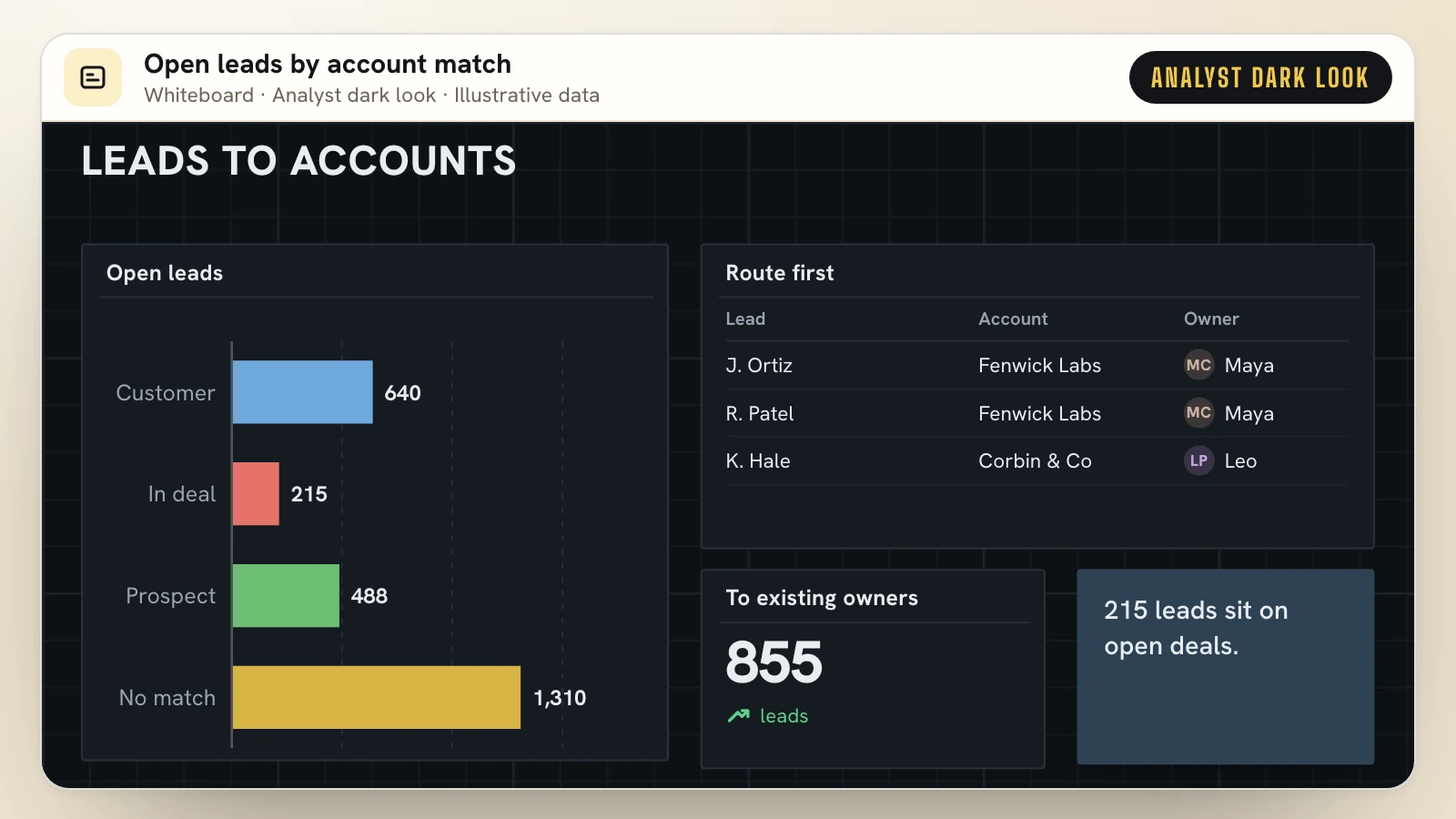
“Which open leads belong to companies that are already customers or have an open deal, and who owns those accounts?”
- took the email domain from every open lead and the website and contact domains from every account
- matched leads to accounts by domain first, then by normalised name with phone or postcode
- listed each match with the account type, owner and the clue that linked it
855 open leads belong to customers or companies with an open deal; Ravensby Foods is on the list, with its account manager's name beside it.
Dig deeper: see how it works
Storek finds that the lead email domain and the account website describe the same thing by looking at the values, so it can use them as a link without anyone configuring it. Leads with personal mail domains are kept out of domain matching, and name-only candidates wait for a person to confirm.
For analysts
SELECT l.lead_id, l.company, a.account_name, a.type, a.owner_name,
       CASE WHEN ad.domain IS NOT NULL THEN 'email domain' ELSE 'name + phone' END AS matched_on
FROM sf_leads l
LEFT JOIN account_domains ad ON ad.domain = LOWER(SUBSTR(l.email, INSTR(l.email, '@') + 1))
LEFT JOIN sf_accounts a ON a.account_id = ad.account_id
WHERE l.status <> 'Converted'
  AND a.type IN ('Customer', 'Prospect - Open Opportunity');
Make it a habit
- Run the match daily or on lead creation, so reps see the account before they dial.
- Show the clue. “Matched on ravensby.co.uk” is easy to trust; a bare link is not.
- Review name-only candidates weekly. They are where most wrong matches hide.
- Keep duplicates out first. Matching works better when leads are already de-duplicated; see the Salesforce duplicates guide.
Where Storek fits
Storek connects to Salesforce through its export or connector, together with billing, support and your spreadsheets, and works out how leads, contacts and accounts link, by domain, phone, address and ID. Ask which leads belong to customers, and you get the list, the owners and the reason for each match. More on the data mapping page.