Platform how-to · Sales operations
HubSpot reporting with billing and support: see every customer's deals, invoices and tickets side by side
Your CRM knows the relationship. Billing knows who pays. The support desk knows who is unhappy. Here's how to put all three on one row per customer, and keep it there.
Priya runs customer success at Fernhill Analytics, a software company with about 900 customers. Every Monday she opens HubSpot to prepare her account reviews. The company record tells her the owner, the plan, the renewal date and the last meeting. It doesn’t tell her that the customer’s last two invoices are 40 days overdue, or that their admin opened six support tickets last week.
Those facts live in two other systems. To see them, Priya exports invoices from billing and tickets from the support desk, pastes them into a spreadsheet and matches company names by hand. “Northgate Ltd” in HubSpot is “Northgate Limited” in billing and “northgate.io” in support. By the time the sheet is ready, the review has started.
This article walks through how to get HubSpot data next to billing and support so that every customer sits on one row, and how to keep it that way without the Monday spreadsheet.
Why the three systems drift apart
Each system was set up by a different team, for a different job:
- HubSpot holds companies, contacts and deals. Sales and success own it.
- Billing holds billing accounts, invoices and payments. Finance owns it, and its customer names come from contracts and tax forms.
- The support desk holds requesters and tickets. Its “organisation” is often created automatically from the email domain of whoever wrote in.
None of them is wrong. They just name the same customer differently, and rarely store each other’s IDs. That’s why a simple lookup on company name fails so often. The same customer spelled three ways is the normal state of affairs, not an exception.
Step by step: one row per customer
Bring each system in as it is
Export or connect your HubSpot companies, contacts and deals, your billing accounts and invoices, and your support tickets. Don’t clean anything first. You want the raw shape, so you can see what each system really calls things.
Find the clues the systems share
Look for fields that two systems both carry. Typical ones are the company domain in HubSpot, the email domain of the billing contact and the email domain of ticket requesters. A tax number, a customer number written into a HubSpot property, or a phone number can help too. The more clues agree, the safer the match. Our guide to matching on more than a name covers how to combine them.
Treat free email domains as no evidence
Thousands of unrelated people write in from personal email providers. A ticket from a personal address can’t be tied to a company by domain alone, so match it on the person’s full email address against HubSpot contacts instead, or leave it unlinked.
Agree what the key words mean
Decide once what “overdue”, “open ticket” and “active customer” mean. Overdue might be “past the due date and not paid in full”. Open might exclude tickets waiting on the customer. Write those down as shared definitions so every report uses the same rule.
Review the uncertain matches
Some companies won’t line up cleanly: a parent with three billing entities, or a customer who changed name. Keep those on a short list for someone who knows the accounts. Twenty minutes of review beats a wrong link that quietly moves revenue between customers.
Asking the question Priya actually has
Once the links exist, Priya doesn’t need the spreadsheet. She asks the question she cares about.
“Which customers renewing in the next 90 days have an overdue invoice and more tickets this month than last?”
- linked HubSpot companies to billing accounts by domain, name and country
- linked support tickets to companies by requester email domain, skipping personal email providers
- applied the team's definitions of overdue and open ticket
- kept customers with a renewal in the next 90 days and both warning signs
Eleven customers renew soon with an overdue invoice and a rising ticket count. Those are the reviews to prepare first.
Dig deeper: see how it works
Each customer on the list shows its renewal date, the overdue amount, ticket counts for this month and last, and the HubSpot owner. Companies that matched on a single weak clue are marked so Priya can check them before acting.
For analysts
SELECT c.company_name, c.owner, c.renewal_date,
       SUM(i.amount_due) AS overdue_amount,
       COUNT(DISTINCT CASE WHEN t.created_at >= DATE_TRUNC('month', CURRENT_DATE) THEN t.ticket_id END) AS tickets_this_month,
       COUNT(DISTINCT CASE WHEN t.created_at >= DATE_TRUNC('month', CURRENT_DATE) - INTERVAL 1 MONTH
                            AND t.created_at <  DATE_TRUNC('month', CURRENT_DATE) THEN t.ticket_id END) AS tickets_last_month
FROM crm_companies c
JOIN company_links l ON l.company_id = c.company_id
LEFT JOIN invoices i ON i.billing_account_id = l.billing_account_id AND i.status = 'overdue'
LEFT JOIN tickets t  ON t.company_id = c.company_id
WHERE c.renewal_date BETWEEN CURRENT_DATE AND CURRENT_DATE + INTERVAL 90 DAY
GROUP BY 1, 2, 3
HAVING SUM(i.amount_due) > 0 AND tickets_this_month > tickets_last_month;
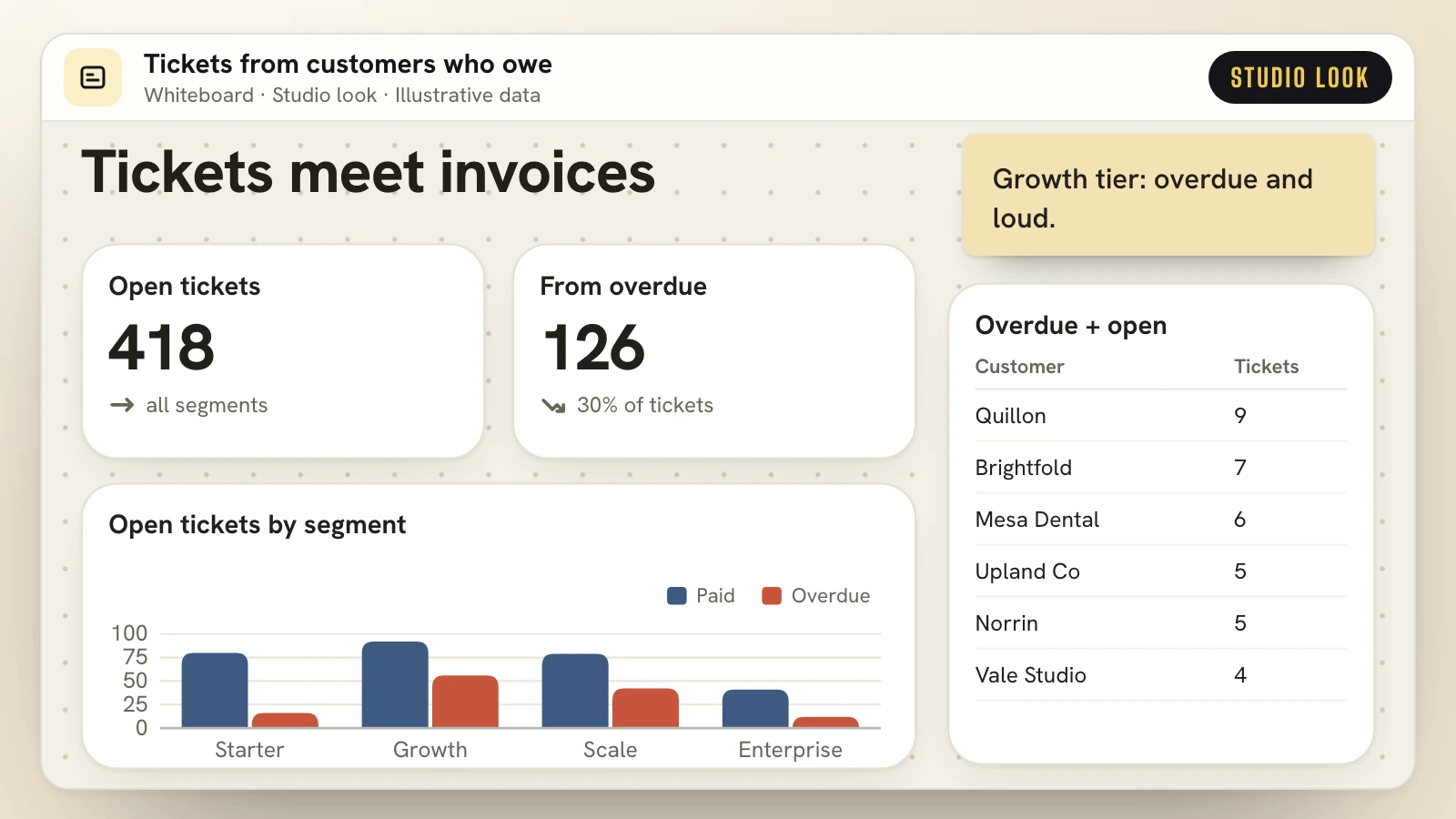
The chart at the top of this page shows the same idea across the whole base: open tickets by segment, split by whether the customer has an overdue invoice. In this invented example, Growth and Scale customers with overdue invoices carry a large share of the open tickets, which is a pattern worth raising with finance and support together.
Questions that need all three systems
Once HubSpot, billing and support line up, a set of everyday questions becomes easy to answer:
For customer success
- Which customers have rising tickets and a renewal this quarter?
- Who hasn’t had a meeting logged in HubSpot for 90 days but opened tickets last week?
For finance
- Which deals are marked closed won with no invoice raised yet?
- Which overdue customers have an open ticket that might explain why they haven’t paid?
For sales leaders
- Do customers who bought an add-on open fewer tickets afterwards?
- Which segment brings the most revenue per support ticket?
Each of these used to mean an export from every system. Now each is one question, answered with the same definitions every time.
Keep it current
The value goes away if the links are rebuilt by hand every quarter. Connect the sources so new companies, invoices and tickets arrive on their own, and let new records link by the same clues. When a new company can’t be linked, it should show up on a review list, not quietly drop out of the report. Records that never link to anything are worth a look in their own right; our article on stale and orphan CRM records explains what to do with them.
Where Storek fits
Storek connects your HubSpot data through an export or connector, alongside billing, support and the spreadsheets your team already keeps. It works out how the records link, shows you the uncertain matches, and lets anyone ask questions like Priya’s in plain English. The answers come back checked and explained, and can go straight onto a dashboard for Monday’s review. See how the linking works on the data mapping page.