Platform how-to · Sales operations
Dynamics 365 with billing and support data: one view of every account's revenue, invoices and tickets
Dynamics 365 is where your account teams live. The warning signs for a renewal often live elsewhere, in a late invoice or a pile of cases. Here's how to bring them together.
Tomás leads account management at Brightwater Logistics Software, a company selling route-planning tools to about 1,200 fleet operators. His team lives in Dynamics 365 Sales: accounts, contacts, opportunities and activities, all in one place. When a renewal comes up, the account manager opens the account form and sees the history of the relationship.
Last spring, Brightwater lost three renewals it thought were safe. Afterwards, the post-mortem found the same pattern each time. Finance had been chasing late invoices for months. Support had logged a steady climb in cases. Neither signal ever reached the account form.
The fix wasn’t a new process. It was putting Dynamics 365 data next to billing and support so the warnings sit on the same row as the renewal date.
What lives where
At most companies the picture looks like Brightwater’s:
- Dynamics 365 Sales holds accounts, contacts, opportunities and the account owner.
- Billing or the finance system holds customers, invoices, payments and credit notes. Its customer names follow contracts and legal entities.
- Support may be Dynamics 365 Customer Service, where cases already point to a Dynamics account, or a separate help desk, where tickets carry only the requester’s email.
The difficulty is the gap between the CRM account and the billing customer. One Dynamics account might be three billing customers (a parent and two subsidiaries), and a billing customer named “BWL Transport GmbH” might be the account called “Brightwater Fleet Partners” in the CRM.
Linking Dynamics accounts to billing and support
Export or connect each source
Bring in Dynamics accounts, contacts and opportunities, the billing customer and invoice tables, and cases or tickets. In Dynamics you can export a view to Excel, or connect through a connector that reads the tables directly. Keep the raw columns, including GUIDs, account numbers and any custom fields your admins added.
Check for an account number field first
Many Dynamics environments already have a field holding the billing customer number, whether the standard Account Number on the account or a custom one. Check how often it’s filled in and whether the values match billing exactly. Watch for leading zeros that got lost on the way through Excel.
Fill the gaps with combined clues
For accounts without a number, combine the website domain on the account, the email domain of the billing contact, the company name and the postcode. Two or three clues agreeing is strong evidence. Our article on identity matching across systems goes through which clues to trust.
Roll subsidiaries up to the account
If Dynamics uses parent accounts, use that hierarchy to roll several billing customers up to the account the renewal sits on. Keep the detail visible, so finance can still see which entity owes what.
Clear duplicates before you count
If the same customer exists twice in Dynamics, its invoices will split between two rows. Flag duplicate accounts and count them once in reports; our Dynamics duplicates guide shows how, without deleting anything.
The renewal question, answered once
With the links in place, Tomás asked the question he wished he’d asked last spring.
“Which accounts renewing in the next two quarters have a late invoice and more support cases than three months ago?”
- linked Dynamics accounts to billing customers by account number, then by domain, name and postcode
- rolled subsidiary billing customers up to their parent account
- counted cases per account for the last month and three months earlier
- kept renewals in the next two quarters with both signs
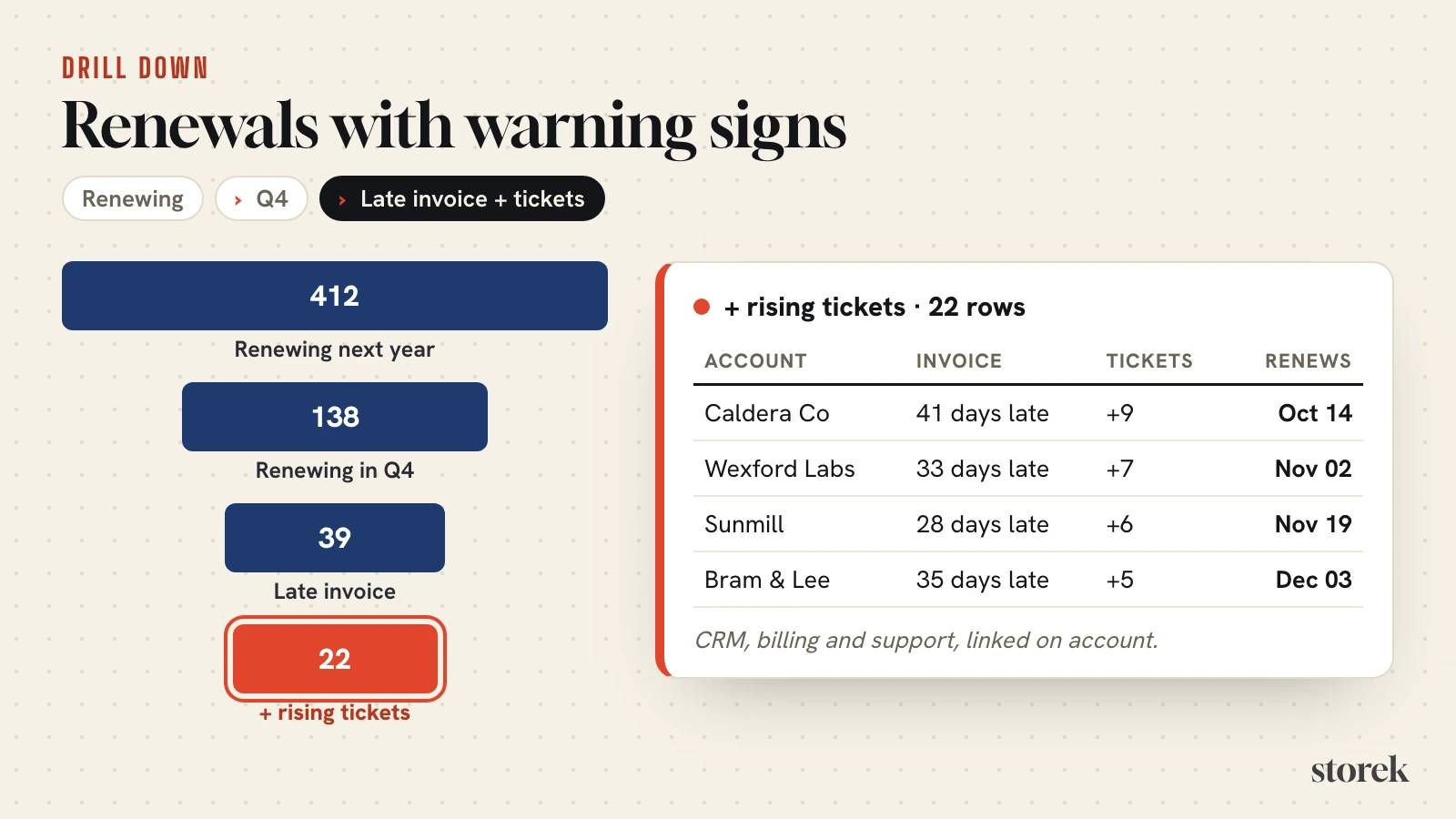
Twenty-one renewals carry both warning signs, fourteen of them in Q4. Those accounts get a joint review with finance and support this month.
Dig deeper: see how it works
Each account on the list shows its owner, renewal date, the days the oldest invoice is late, and the case trend. Accounts linked only on name are marked, so the team checks them first.
For analysts
SELECT a.account_name, a.owner, a.renewal_date,
       MAX(CURRENT_DATE - i.due_date) AS days_late,
       COUNT(DISTINCT CASE WHEN c.created_on >= CURRENT_DATE - INTERVAL 30 DAY THEN c.case_id END) AS cases_last_30,
       COUNT(DISTINCT CASE WHEN c.created_on >= CURRENT_DATE - INTERVAL 120 DAY
                            AND c.created_on <  CURRENT_DATE - INTERVAL 90 DAY THEN c.case_id END) AS cases_3m_ago
FROM accounts a
JOIN account_billing_links l ON l.account_id = a.account_id
JOIN invoices i ON i.billing_customer_id = l.billing_customer_id AND i.paid_at IS NULL AND i.due_date < CURRENT_DATE
LEFT JOIN cases c ON c.account_id = a.account_id
WHERE a.renewal_date < CURRENT_DATE + INTERVAL 6 MONTH
GROUP BY 1, 2, 3
HAVING cases_last_30 > cases_3m_ago;
The chart at the top of this page is the same result for the whole base: renewals by quarter, with the accounts showing both signs stacked on top.
Reports account teams use
Once the three systems line up, a few views earn their place:
Renewal risk board
Every renewal in the next two quarters, with days late on invoices, case trend and last activity from Dynamics. Sort by risk, not by date.
Won but not billed
Opportunities marked won in Dynamics with no matching invoice after 30 days. This one usually pleases finance first.
Service cost per account
Cases per account set against annual revenue from billing. It shows where a customer costs more to serve than the plan suggests, which is a useful fact for the next pricing conversation.
Keep the CRM as the place people work
None of this asks your account team to leave Dynamics 365 or change how they enter data. The linked view sits beside the CRM. New accounts, invoices and cases link by the same rules as they arrive, and anything that can’t be linked lands on a short review list instead of disappearing.
Where Storek fits
Storek connects to Dynamics 365 through its export or a connector, alongside billing, support and spreadsheets. It works out how accounts, billing customers and cases link, flags duplicates and uncertain matches, and lets the team ask renewal questions in plain English. Answers come back checked and explained, and the renewal board can live on a dashboard the whole team sees.